
How long does it take to switch IT providers in Houston?
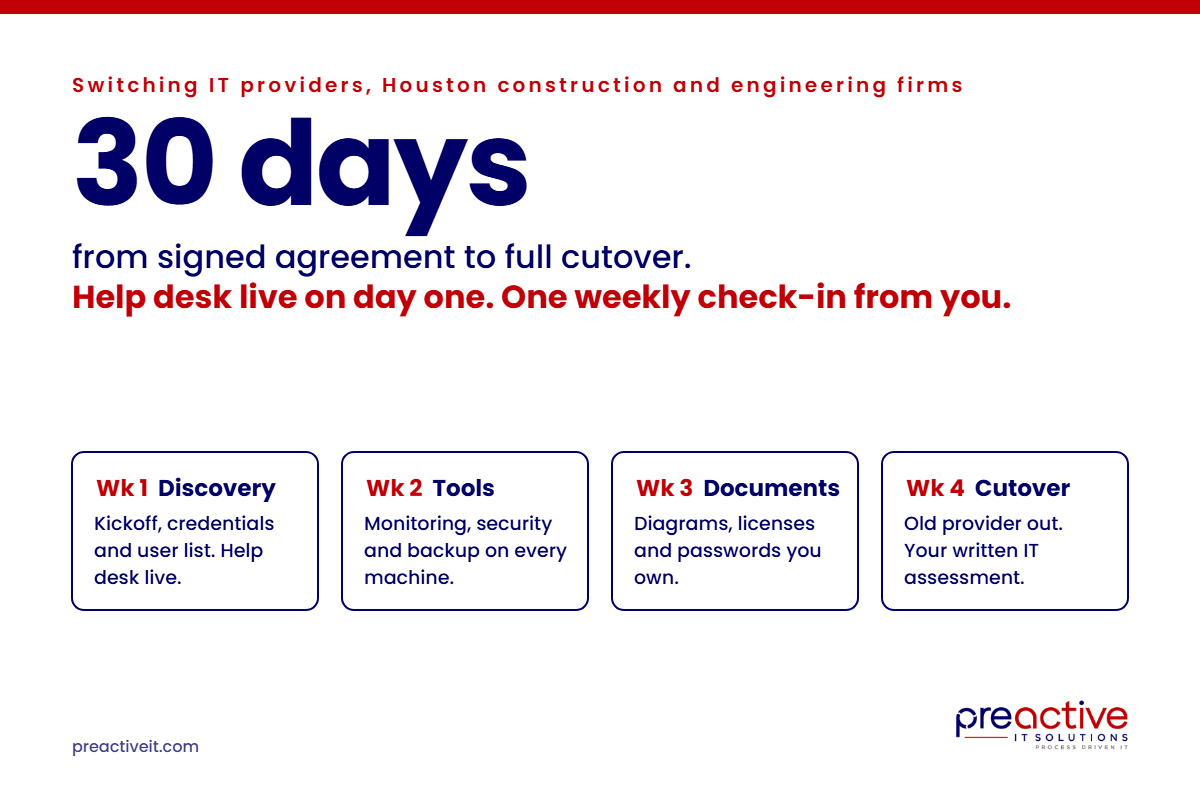
Switching IT providers takes about 30 days at Preactive IT Solutions. That is the time from signed agreement to full cutover of managed IT services for a typical Houston construction or engineering firm of 40 to 250 users. Your help desk coverage starts on day one, not day 30. A dedicated onboarding project manager runs the transition. We overlap with your outgoing provider instead of cutting over cold, and you get a written IT assessment at the end. Your side of the work is one weekly check-in.
The fear that keeps firms with a provider they have outgrown is the switch itself. Most owners picture a month of outages, lost passwords and a field crew that cannot get into the plans. That is not how a planned transition goes. This post walks through the 30 days, what we need from you and your old provider and what can slow it down.
What happens in each week of a 30-day managed IT services switch?
Week 1 is discovery and day-one help desk, week 2 is tools, week 3 is documentation and week 4 is cutover, with your notice period before any of it. Every client is different, so the order shifts, but the pieces do not.
Before day one: notice and agreement
Check your current contract for the notice period. Most managed IT agreements need 30 to 90 days’ written notice, and some auto-renew for a year if you miss the window. Give notice in writing, keep a copy and ask for the full list of what you own: domain registrations, Microsoft 365 tenant, firewall, backups, software licenses and the admin credentials to all of it. Then sign with the new provider so the clock can start.
Week 1: discovery, credentials and day-one help desk
Your onboarding project manager holds a kickoff with you and gathers everything the technicians need: user list, locations, applications, vendors and the credentials your old provider hands over. Our help desk starts taking your calls this week. If a user cannot print or a superintendent is locked out, they call us, and we work it with the outgoing provider in the background if we need something only they still hold.
Week 2: monitoring, security and backup in place
Our management agent, endpoint protection, email security and backup go onto every computer and server. This is the week your environment goes from invisible to visible. We usually find things the old provider never mentioned: unpatched machines, backups that have not completed in months, former employees still holding accounts. Those go on the assessment list so you can decide what to fix and when.
Week 3: documentation and standards
Network diagrams, vendor contacts, license inventories and a password system that belongs to you, not to any IT company. Your account manager reviews the environment against our IT standards and marks what meets them and what does not. Nothing gets bought this week. The point is a clear picture.
Week 4: cutover and the written assessment
The old provider’s tools come off, their access is removed and their admin accounts are closed. You get a written IT assessment: what you have, what is at risk, what should change and in what order, with costs. From here the relationship moves to normal support, on-site visits as needed and quarterly reviews with your account manager.
What does your team have to do during the switch?
One weekly check-in. Your onboarding project manager meets with you or your office manager once a week for the four weeks to cover what was done, what is next and anything we need signed or scheduled. Beyond that, your users accept an agent install and keep calling the help desk the way they always have, only now it is ours.
What we do not need: a project team on your side, an IT person to translate or your principals in the weeds. Most of the switch happens on evenings and in the background, and the few steps that touch users are scheduled around bids, closings and pours.
What do you need from your old IT provider?
A clean handoff needs five things from the outgoing company. Ask for them in writing with your notice.
- Administrative credentials to every system: servers, firewall, switches, wireless, Microsoft 365 global admin, backup console and any cloud applications they manage for you.
- Domain and DNS control. Your domain name and DNS records should be registered to your company, not to the provider. If they are not, that transfer starts now.
- Licenses and subscriptions. A list of what is in your name, what is in theirs and what will stop working on their last day.
- Documentation. Network diagrams, IP schemes, vendor contacts and whatever they have on your line-of-business applications.
- A last-day date and a commitment to keep their tools running until then.
Most providers cooperate. Being fired is not fun, but the good ones know the industry is small. When one drags its feet, the overlap period is what protects you. Our tools are already on your machines and our help desk is already answering, so a slow handoff is usually an inconvenience rather than an outage.
What slows down a switch?
Four things: missing credentials, assets registered to the old provider, worn-out hardware and bad timing.
- Credentials the old provider cannot find. Firewall and switch passwords are the usual gap. The fix is a factory reset and a reconfiguration, which adds a few days and a site visit.
- Domains and Microsoft 365 tenants registered to the provider. Transfers take time and the provider’s cooperation. Check this before you give notice.
- Hardware that has been limping. If the server is eight years old or the firewall is out of support, the assessment will say so. Replacing it is a separate project, not a reason to delay the switch.
- Timing. A switch that starts the week of a bid deadline or year-end close will take longer than one that starts in a quiet stretch. Tell us the dates that matter and we plan around them.
When should a construction or engineering firm time the switch?
Any month works, but some weeks do not. Avoid starting the week before a major bid submission, a software version upgrade, a year-end close or an office move. Starting right after one of those is ideal. The one deadline you cannot move is your old provider’s notice window, so read the contract first and work backward from the last day.
If the reason you are switching is response time, read why businesses keep switching IT providers before you choose the next one, and compare candidates on the four questions that settle it. Switching is a 30-day project. Choosing on price alone means doing it again in two years.
Frequently asked questions
How long does it take to switch IT providers?
About 30 days from signed agreement to full cutover for a typical 40 to 250 user firm, plus whatever notice period your current contract requires, usually 30 to 90 days. Help desk coverage from the new provider should start on day one, not at the end.
Will we have downtime when we switch IT companies?
A planned transition should not cause downtime. Monitoring, security and backup tools install in the background, and the old provider’s tools stay in place until the new ones are proven. The steps that touch users, like a password system or a new login method, are scheduled around your busy days.
What if our current IT provider will not cooperate?
The overlap period protects you. The new provider’s help desk and tools are live before the old provider’s last day, so a slow handoff of passwords or documentation is usually an inconvenience rather than an outage. Firewall and switch credentials that never arrive are handled with a reset and reconfiguration.
Who owns our domain, Microsoft 365 tenant and backups?
You should. Before giving notice, confirm that your domain name, DNS, Microsoft 365 tenant, backups and software licenses are registered in your company’s name. If any are in the provider’s name, start the transfer before the notice period runs out.
How much of our time does an IT provider switch take?
At Preactive IT Solutions in Houston, one weekly check-in with your onboarding project manager for four weeks. Users accept an agent install and keep calling the help desk. You do not need an internal IT person or a project team. The rest of the work happens on our side.
What do we get at the end of onboarding?
A written IT assessment: an inventory of what you have, what is at risk, what should change and in what order, with costs. It becomes the roadmap your account manager reviews with you each quarter, and it is yours to keep whether you stay with us or not.
About Preactive IT Solutions
Preactive IT Solutions is a Houston managed IT services provider specializing in construction and engineering firms, serving Texas businesses since 2003. We support organizations of 40 to 250 users with a 24/7 help desk staffed by our own technicians, one technician per 150 users and an average client relationship of more than eight years. See the full managed IT services in Houston offering, or ask us what a switch would look like for your firm.